
效果:
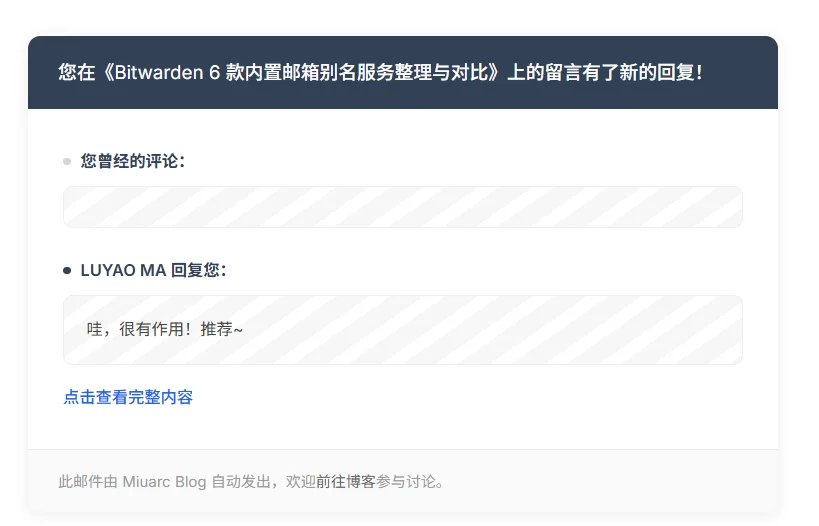
<!DOCTYPE html> <html lang="zh-CN"> <head> <meta charset="UTF-8"> <meta name="viewport" content="width=device-width, initial-scale=1.0"> <title>您在 {{site_name}} 收到了新回复</title> <style> body { margin: 0; padding: 0; background-color: #f5f5f5; font-family: -apple-system, BlinkMacSystemFont, "Segoe UI", Roboto, "Helvetica Neue", Arial, "Noto Sans SC", "PingFang SC", "Microsoft YaHei", sans-serif; -webkit-font-smoothing: antialiased; } .wrap { width: 100%; padding: 40px 16px; box-sizing: border-box; } .card { max-width: 600px; margin: 0 auto; background: #ffffff; border-radius: 10px; overflow: hidden; box-shadow: 0 2px 12px 0 rgba(0,0,0,0.08); } .top { background: #334155; padding: 18px 24px; } .top h1 { margin: 0; font-size: 15px; font-weight: 500; color: #ffffff; line-height: 1.5; word-break: break-all; } .body { padding: 32px 28px 16px; } .comment-block { margin-bottom: 24px; } .comment-block:last-of-type { margin-bottom: 16px; } .comment-tag { font-size: 13px; font-weight: 600; color: #334155; margin-bottom: 10px; display: flex; align-items: center; gap: 8px; } .comment-tag::before { content: ""; display: inline-block; width: 6px; height: 6px; border-radius: 50%; background: #cbd5e1; } .comment-block.reply .comment-tag::before { background: #334155; } .quote { border-radius: 8px; padding: 16px 18px; font-size: 13px; color: #444444; line-height: 1.7; word-break: break-all; background: repeating-linear-gradient(145deg, #f7f7f7, #f7f7f7 15px, #ffffff 0, #ffffff 25px); border: 1px solid #eeeeee; } .link { margin: 8px 0 16px; font-size: 13px; } .link a { color: #2563eb; text-decoration: none; font-weight: 500; } .link a:hover { text-decoration: underline; } .foot { padding: 14px 24px; border-top: 1px solid #eeeeee; background: #fafafa; } .foot p { margin: 0; font-size: 12px; color: #999999; line-height: 1.8; } .foot a { color: #666666; text-decoration: none; } @media screen and (max-width: 480px) { .wrap { padding: 24px 12px; } .body { padding: 24px 20px 12px; } .top { padding: 16px 20px; } } </style> </head> <body> <div class="wrap"> <div class="card"> <div class="top"> <h1>您在《{{page_title}}》上的留言有了新的回复!</h1> </div> <div class="body"> <div class="comment-block"> <div class="comment-tag">您曾经的评论:</div> <div class="quote">{{content}}</div> </div> <div class="comment-block reply"> <div class="comment-tag">{{reply_nick}} 回复您:</div> <div class="quote">{{reply_content}}</div> </div> <p class="link"><a href="{{link_to_reply}}" target="_blank">点击查看完整内容</a></p> </div> <div class="foot"> <p>此邮件由 {{site_name}} 自动发出,欢迎<a href="{{link_to_reply}}" target="_blank">前往博客</a>参与讨论。</p> </div> </div> </div> </body> </html>- 收藏支持反对打赏
- 暂无回复